01
Intelligent PSN search
Search Proper Shipping Names and retrieve the linked UN number, hazard class, packing group and packing instruction in one step.
See the interface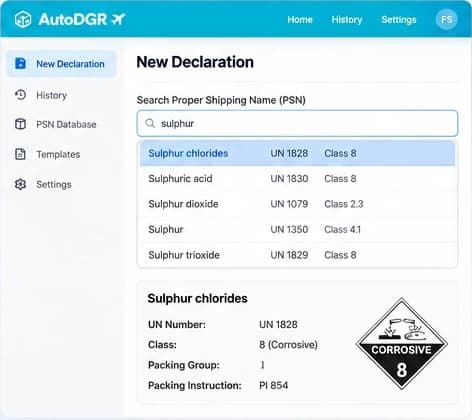
IATA DGDShipper's Declaration software for air cargo
Create IATA Shipper's Declarations faster with intelligent validation, automated packing calculations, and professional PDF generation.
The problem
Preparing dangerous goods declarations manually requires navigating complex regulations, verifying packing instructions, checking aircraft restrictions, and completing detailed documentation.
Even small errors can cause shipment delays, rejection, additional costs, or compliance risks.
Searching regulations for UN numbers, packing instructions, and quantity limits consumes valuable time.
Determining permissible quantities and packaging configurations requires careful interpretation.
Incorrect declarations, missing information, or inappropriate labels can lead to shipment rejection.
Preparing and reviewing declarations manually slows shipment operations.
The solution
AutoDGR brings regulatory checks, packing calculations, package visualization, and declaration generation into one streamlined workflow.
Search Proper Shipping Names and retrieve the linked UN number, hazard class, packing group and packing instruction in one step.
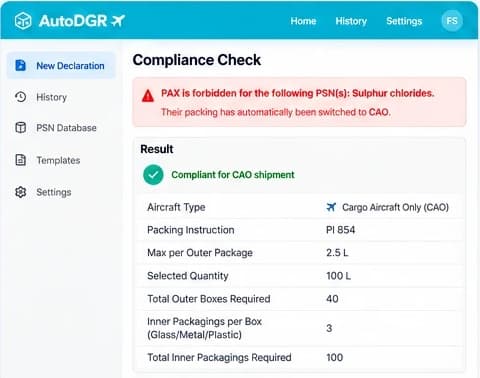
See the interfaceAutoDGR determines PAX or CAO restrictions and notifies you clearly when cargo-aircraft-only handling is required.
Calculate packing requirements based on the selected packing instruction, shipment quantity and packaging material.
How it works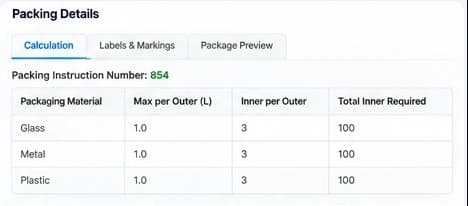
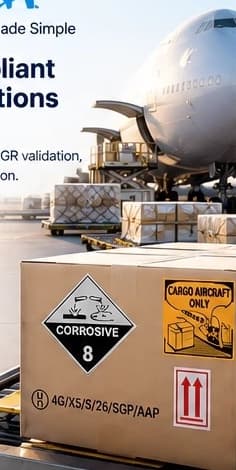
Identify the applicable hazard labels, handling labels and UN specification markings for every package.
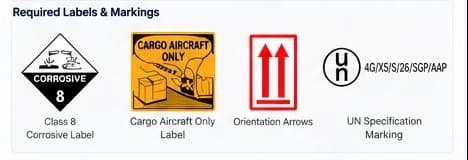
Review package markings and label placement through an intuitive visualization before preparing the shipment.
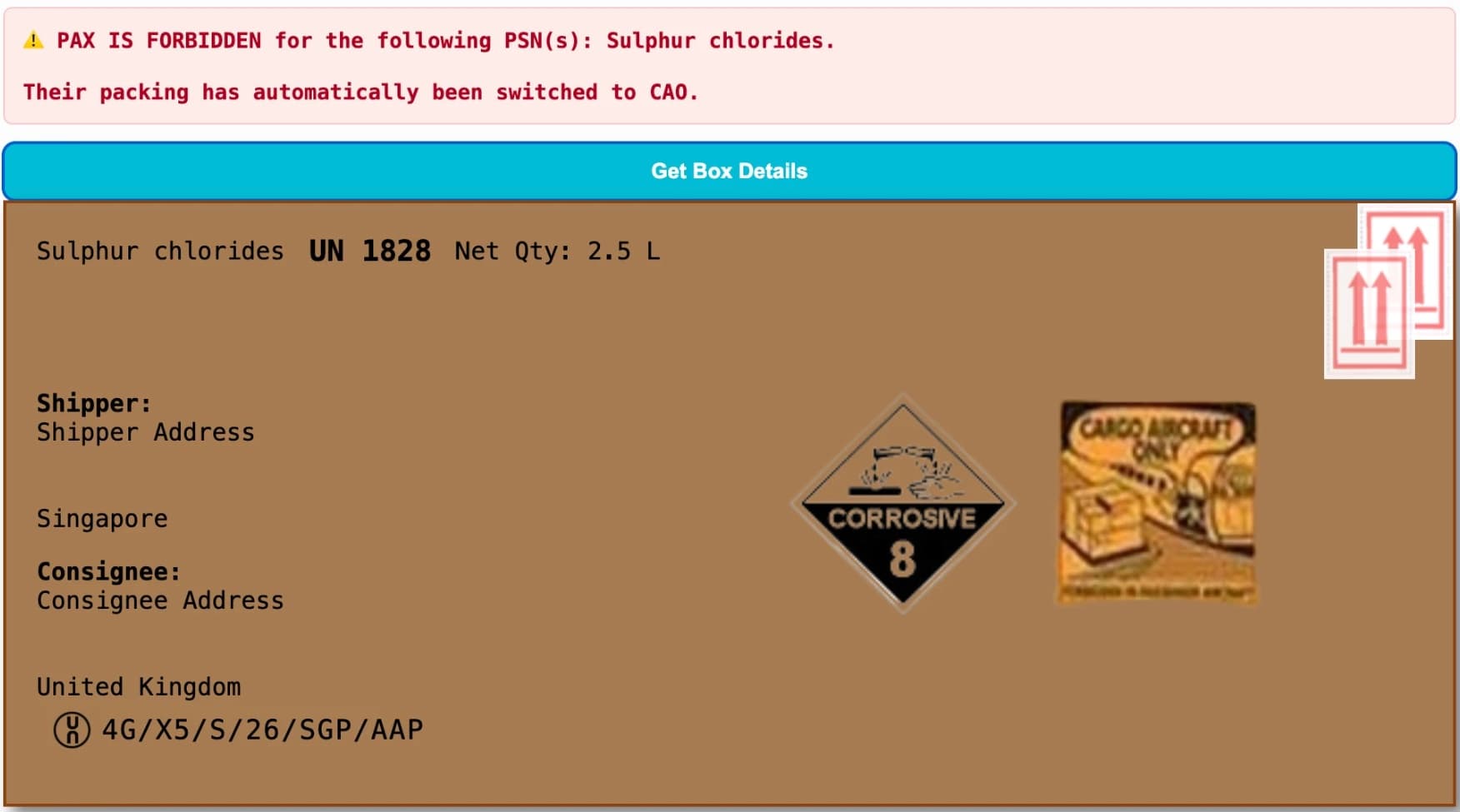
Generate professionally formatted IATA Shipper's Declaration PDFs using validated shipment data, subject to final shipper verification.
Start your first declaration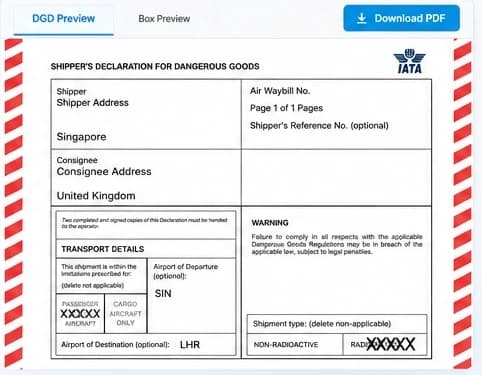
Access previously prepared declarations and shipment records for operational tracking and audits.
How it works
Step 1
Search and select the Proper Shipping Name. AutoDGR retrieves the corresponding UN number and linked regulatory information.
Step 2
Enter quantity, unit, shipper information, and consignee details.
Step 3
The rules engine checks aircraft eligibility, applicable packing instructions, and quantity limits.
Step 4
Review the calculated packing requirements, labels, and package visualization.
Step 5
Verify the declaration, complete the signatory information, and download the formatted PDF.
Real screens from AutoDGR. Choose a step to take a closer look.
Search a Proper Shipping Name and get the UN number, class, packing group and packing instruction.
Why AutoDGR
Reduce repetitive manual work during declaration preparation.
Apply configured regulatory rules consistently across shipments.
Identify missing information and potential regulatory conflicts before generating documents.
Receive calculated packaging requirements instead of relying entirely on manual calculations.
Generate properly structured declaration PDFs ready for verification and signing.
Maintain a history of prepared shipments and associated documents.
Prepare shipment documentation more efficiently and reduce repetitive data entry.
Simplify the preparation of dangerous goods declarations.
Support consistent validation and review processes.
Improve document clarity and support operational checks.
Compliance & trust
AutoDGR uses structured regulatory data and validation logic to support declaration preparation. The software does the lookups and calculations; a qualified person reviews and signs every declaration before it is final.
Important: AutoDGR is a documentation and compliance-support tool. Users remain responsible for verifying shipment information, applying the current applicable regulations, and ensuring that declarations are reviewed and signed by authorized personnel.
AutoDGR is for dangerous goods professionals. Every user must have successfully completed IATA DGR CBTA 7.1 (Dangerous Goods Regulations Competency-Based Training and Assessment) training before using the software.
Every Shipper's Declaration for Dangerous Goods prepared with AutoDGR must be signed by a qualified person. AutoDGR prepares the document, and responsibility for checking and signing it stays with that person.
Yes. The trial package gives you 10 days to try AutoDGR. The trial runs on a restricted database, so some substances and live features are not available until you subscribe.
To keep using AutoDGR after the 10-day trial, you need a paid subscription. All operational use of the software beyond the trial is as a paying customer.
The Starter Pack is USD 390 per user per year, or USD 39 per user per month on a pay-as-you-go basis. The Professional Pack covers 5 users for USD 1,500 per year, or USD 150 per month. Enterprise pricing is tailored on request. See the Pricing page for details.
Preferred Proper Shipping Names are the PSNs you ship most often, set up in your account for quick access. The Starter Pack includes 20 preferred PSNs and the Professional Pack includes 30. We configure them once your first payment has been received.
Subscriptions renew every year. The renewal fee must be paid before your package continues, so pay before your renewal date to avoid an interruption.
Yes. You can print the generated DGD and submit it to the aircraft operator.
No. Each user ID and password belongs to one person and must not be shared. If several people need access, choose a plan with the number of user accounts you need.
No. AutoDGR is not responsible for typing errors or incorrect information entered by users. Check all shipment details carefully before the declaration is signed and submitted.
Spend less time preparing declarations and more time moving shipments.
Contact
Have questions about AutoDGR or want to see how it works? Get in touch with our team.